

Reclaim
Find what is actually taking your disk space on a Mac.
Reclaim is a free macOS app that finds reclaimable disk space and removes only what you tick. It is built for developers: it measures the caches other cleaners miss — Xcode archives and DerivedData, iOS simulators, node_modules, Gradle, Homebrew, Docker images and downloaded AI model weights — and explains what each item is before you decide. Scanning is always free and unlimited, and so is clearing anything it classes safe.
- Platforms
- macOS
- Price
- Free
- Status
- live
Not quite ready to download
The build is finished and in Apple's notarization queue — the step that lets macOS open it without a warning. Ask us and we will tell you the day it lands.
A look at it
Reclaim, start to finish — a real scan and a real clean. 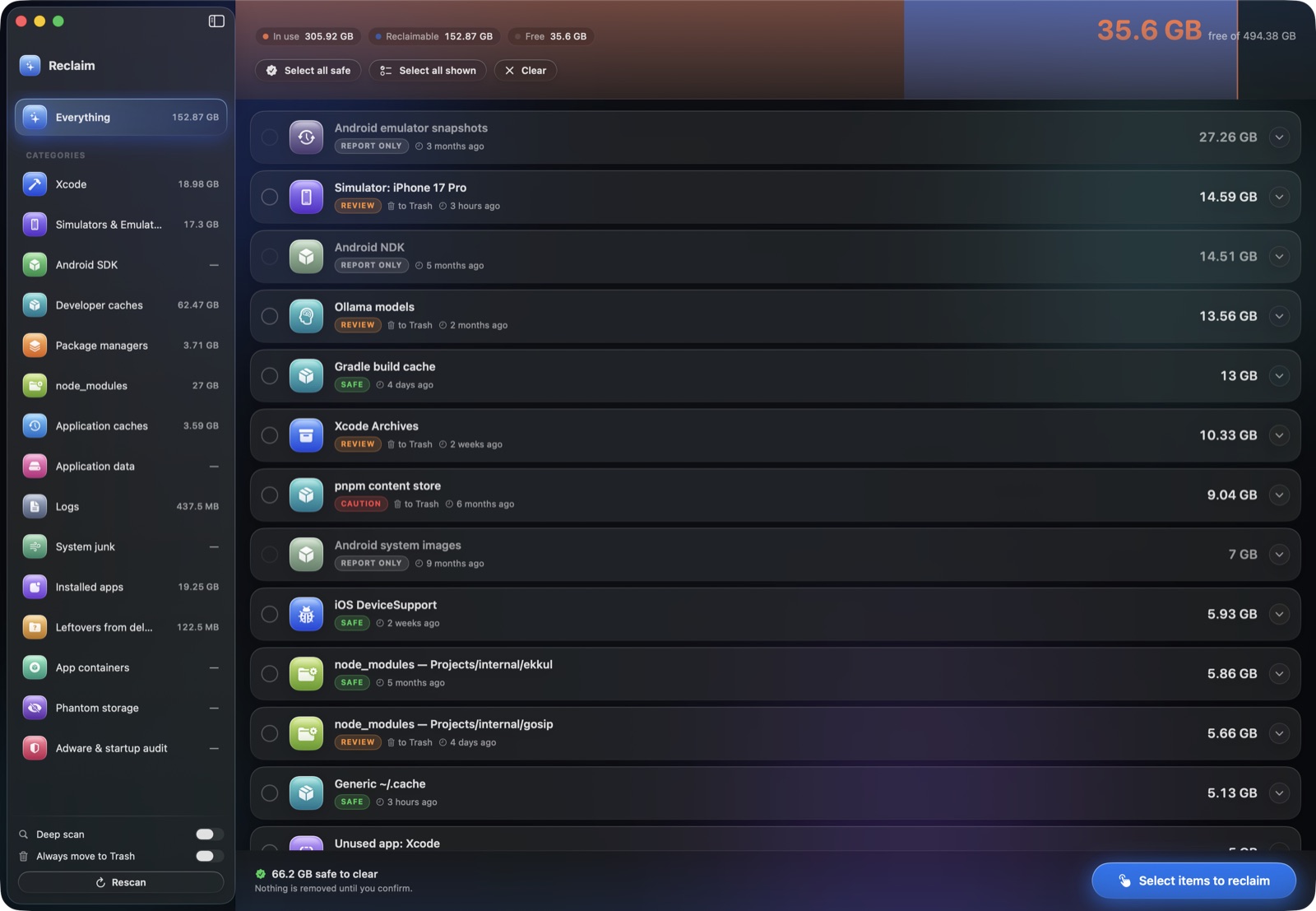
Findings grouped by category, each labelled safe, review or caution. 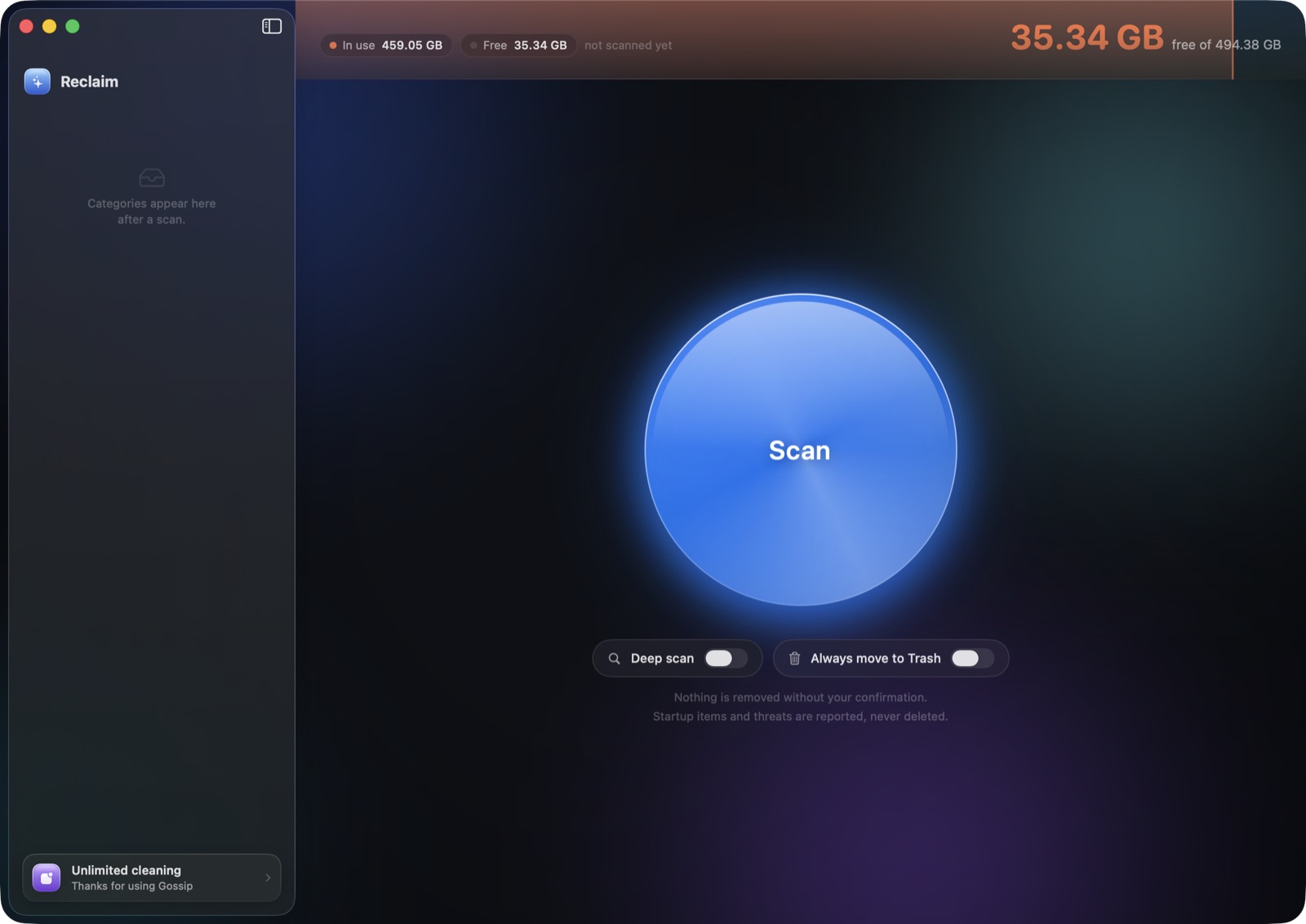
Scanning is free and unlimited — nothing is removed without confirmation.
The problem
Your Mac is full, and you deleted the files already.
Time Machine snapshots, purgeable space and Docker disk images are why deleting things often changes nothing. Reclaim finds what is really taking the space.
A real scan of a working developer Mac.
One scan, on a real machine
- reclaimable, found on a working developer Mac
- 152.87 GB
- classified safe to clear without review
- 66.2 GB
- categories scanned, from Xcode archives to Docker images
- 17
- for a typical scan
- ~90 s
reclaimable, found on a working developer Mac
classified safe to clear without review
categories scanned, from Xcode archives to Docker images
for a typical scan
Built for developers
The caches other cleaners miss
Xcode DerivedData and archives, iOS simulators, Android SDKs and NDKs, node_modules, Gradle, Homebrew, CocoaPods, Docker images and downloaded model weights — measured, grouped and explained.
Scanning is free and unlimited.
Nothing is removed without your confirmation.
Every path passes a deny-by-default guard. Documents, keychains, iCloud Drive and system folders are refused even if a scan asks for them.
Also in the box
A threat audit and a command line
The audit flags startup items that behave like malware loaders, unsigned launch agents, hosts-file hijacks and browser extensions — with the evidence, and it never deletes on its own. The same engine runs from the terminal: reclaim scan, reclaim clean --interactive, reclaim doctor and reclaim audit.
Key facts
- Found on a working developer Mac
- 152.87 GB reclaimable
- Classified safe to clear without review
- 66.2 GB
- Categories scanned
- 17, from Xcode archives to Docker images
- Typical scan time
- About 90 seconds
- Price
- Free. A key for the rest is $3 a year.
What it does
Developer caches other cleaners miss
Xcode DerivedData and archives, iOS simulators, Android SDKs and NDKs, node_modules, Gradle, Homebrew, CocoaPods, Docker images and downloaded model weights.
Nothing is removed without your confirmation
Every path passes a deny-by-default guard. Your documents, keychains, iCloud Drive and system folders are refused even if a scan asks for them.
Explains the space you cannot see
Time Machine snapshots, purgeable space and Docker disk images are why deleting files often changes nothing. Reclaim reports them and says what actually helps.
A threat audit that reports, never deletes
Flags startup items that behave like malware loaders, unsigned launch agents, hosts-file hijacks and browser extensions — with the evidence, so you decide.
A command-line tool in the same app
reclaim scan, reclaim clean --interactive, reclaim doctor and reclaim audit, sharing one engine with the app.
About Reclaim
The problem
You delete things and the disk stays full. Finder says one number, About This Mac says another, and neither of them is the number that matters.
On a working developer Mac the space is rarely in your documents. It is in
places nothing ever asks you about: Xcode archives from builds you shipped a
year ago, simulator runtimes for iOS versions you no longer support, Gradle and
Homebrew and pnpm caches, Docker images, node_modules in projects you have not
opened since spring, and AI model weights measured in tens of gigabytes.
What Reclaim does about it
It measures all of it and then explains every item before it removes anything. Each finding carries a label — safe, review, caution or report only — and a sentence saying what the thing is and what losing it costs you. A Gradle cache rebuilds itself; an Xcode archive is how you re-symbolicate a crash from a shipped build. Those are not the same decision, and a cleaner that calls both "junk" is asking you to gamble.
How it decides
Every path passes a deny-by-default guard before deletion. Your documents,
keychains, iCloud Drive, system folders and configuration are refused even if
a scanner asks for them. Projects you have touched recently are classified
more conservatively than ones you have not — an active repository's
node_modules is review, an abandoned one's is safe.
What it will not do
It will not delete a startup item or a piece of adware. It reports those, with the evidence and the command to remove them yourself, because something that silently removes things that launch at login is indistinguishable from the problem it claims to solve.
It is not an antivirus and does not pretend to be one.
What it costs
Free, no account required, no adverts, and nothing leaves your machine.
Scanning is never limited — every category, the full report, every time. Nor is clearing anything it labels safe: caches, build output, machine state that rebuilds itself. Clear that as often as you like, for nothing, forever.
The rows that need a judgement call — unused apps, Xcode archives, simulator runtimes, leftovers from apps you deleted — unlock when you connect a Gossip account, which costs nothing. If you would rather not have one, a key does the same thing for $3 a year — 25¢ a month, charged once.
A key covers one Mac at a time and can be moved: removing it in Reclaim frees it for the next machine. It is checked on your Mac, not on a server — after the first activation the app never contacts us again, so an outage, a flight, or this company disappearing cannot lock you out of something you paid for.
The line is drawn around what an item is, not how often you clean or how much you clear at a time. A cache either goes or it does not: half-deleting one is worse than leaving it, because "it rebuilds itself" is only true if it goes whole. So nothing is ever partly removed, and nothing you ticked is quietly skipped — a locked row cannot be ticked in the first place.
Get Reclaim
- System requirements
- macOS 13 Ventura or later · Apple silicon and Intel · about 120 MB
- Price
- Free
Reclaim — common questions
- Is Reclaim free?
- Yes. Reclaim is free to download and scanning is never limited. Cleaning is capped at once a week when signed out, and an active Gossip account lifts that cap entirely.
- Is it safe to delete what Reclaim finds?
- Every item is labelled safe, review or caution, and nothing is removed until you tick it and confirm. Anything classed safe regenerates on its own — caches and build output. Reclaim refuses to touch your documents, keychains, iCloud Drive or system folders even if asked.
- Why does my Mac still say the disk is full after deleting files?
- Usually Time Machine local snapshots. macOS snapshots your disk hourly even with no backup drive attached, and a snapshot holds on to every block that existed when it was taken — so files you delete afterwards still occupy space. Reclaim's doctor command reports snapshots, purgeable space and oversized Docker disk images, which are the three usual causes.
- Does Reclaim send my files anywhere?
- No. Reclaim makes no network request until you choose to sign in, and it never sends file names or paths. Scanning happens entirely on your Mac.
- Is Reclaim on the Mac App Store?
- Not for the full version. The App Store sandbox blocks the filesystem access and system tools Reclaim needs, so an App Store build could not see developer caches, system caches or app leftovers — most of what it finds.
- What macOS version does Reclaim need?
- macOS 13 Ventura or later, on both Apple silicon and Intel Macs.